Dormitory Network User Guide
Important Information
To ensure the quality of the dormitory network and assist students in resolving network issues, please contact the Network Services Division of the Office of Library and Information Services or send an email with a description of the issue and your contact information to dormnet@isu.edu.tw.
Dormitory Network Restrictions
- Please read the dormitory network regulations carefully.
- This guide is provided to help new students understand the dormitory network rules.
Network Support and Assistance
- Office hours: Monday to Friday, 08:00–17:00.
- Evening support: 19:00–23:00 at the dormitory service desk.
- Students may also seek assistance through the ISU Dormitory Network Discussion Forum.
Services Provided by Dormitory Network Assistants
- Assist students with network configuration.
- Help troubleshoot internet connection issues.
- Provide computer and network advice. (Network Assistants do not provide OS reinstallation services)
- Report unresolved issues to the Network Services Division.
Dormitory Network Management Regulations
Amended and approved during the Departmental Affairs Meeting on December 25, 2024 (Items 1, 3, 4, 10–12), authorized and announced by the President on January 3, 2025, and implemented starting February 1, 2025.
- 1. Dormitory networks are a component of the campus network infrastructure, primarily intended to support academic purposes. For efficient utilization and proper governance, these "I-Shou University Student Dormitory Network Management Regulations" (hereafter referred to as the Regulations) are established in accordance with the "Ministry of Education Campus Network Use Guidelines" and the "I-Shou University Campus Network Use Regulations".
- 2. The dormitory network services are explicitly dedicated to current residents of the university dormitories.
- 3. To support residential students, the university assigns "Dormitory Network Assistants" to assist with network configuration, setup initialization, and basic hardware or connectivity troubleshooting.
- 4. Under the authorization of the Office of Library and Information Services, Dormitory Network Assistants are permitted to perform the following service procedures:
(1) Inspect and test physical network ports.
(2) Report operational issues regarding network communication hardware.
(3) Provide user advisory services for computer network queries.
(4) Assist residents with basic dormitory network configuration parameters.
(5) Verify and audit user IP allocation, MAC addresses, and related configurations.
(6) Temporarily disconnect network segments or individual nodes when necessary to preserve overall network bandwidth stability.
(7) Perform other technical support activities authorized by the Office of Library and Information Services. - 5. All dormitory residents requiring access to the network infrastructure must provide their own computer system, network adapter (RJ-45 interface), and one standard Ethernet cable (Unshielded Twisted Pair - UTP).
- 6. Users are strictly prohibited from utilizing network resources to transmit data that is threatening, obscene, hostile, or commercial in nature.
- 7. The university allocates specific network settings unique to each dormitory building, floor level, and room number. Unauthorized variations or failure to follow settings will result in the immediate suspension of network access privileges.
- 8. If an individual computer becomes infected with malicious software or originates cyber attacks that degrade overall dormitory network stability, its network access privilege will be suspended.
- 9. The administrative operation and supervision of the dormitory network fall under the Office of Library and Information Services. Major policy infractions will lead to an immediate suspension of connectivity and formal reporting to university disciplinary authorities.
- 10. The transmission of high-volume data unrelated to teaching, research, or administrative requirements is strictly prohibited. Daily data usage outside the local dormitory subnet is monitored; the data limit is 8GB per day (Upload + Download combined). Infractions will trigger an automatic bandwidth throttle to 64Kb/s for a duration of 12 hours.
- 11. Future revisions to these regulations will be published via official campus announcements. Unaddressed technical contingencies shall defer to the overarching governance of the "I-Shou University Campus Network Administration Policy".
- 12. These regulations are officially enacted upon review and approval by the Departmental Affairs Meeting, followed by presidential authorization and public announcement.
IP Address Configuration Guide
For Windows 10 / Windows 11


For macOS

Dormitory Room IP Address Lookup
Please select your dormitory building and floor to view the corresponding IP allocation map.
First Dormitory Area
Second Dormitory Area
Medical Campus Dormitory Area
Faculty Dormitory Area
Basic Network Troubleshooting
If you are unable to connect to the internet, please attempt the following troubleshooting procedures:
Reinstall Network Adapter (Windows)
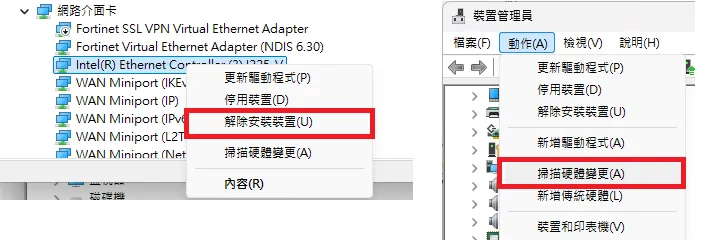
Right-click Start → Device Manager → expand Network Adapters → Right-click your network card (commonly named Ethernet, Realtek, or USB Network Adapter) → Uninstall Device → Click Action at the top menu → Scan for Hardware Changes.
View Network Settings
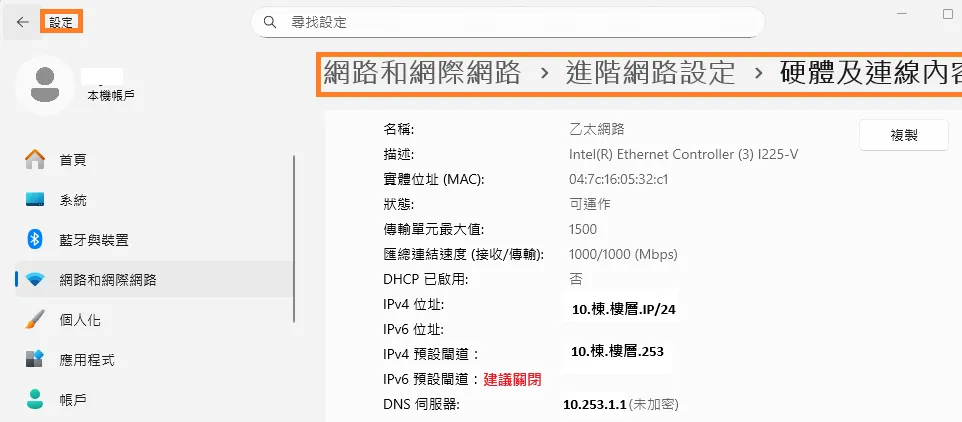
Right-click Start → Settings → Network & Internet → Hardware Properties.
Network Reset
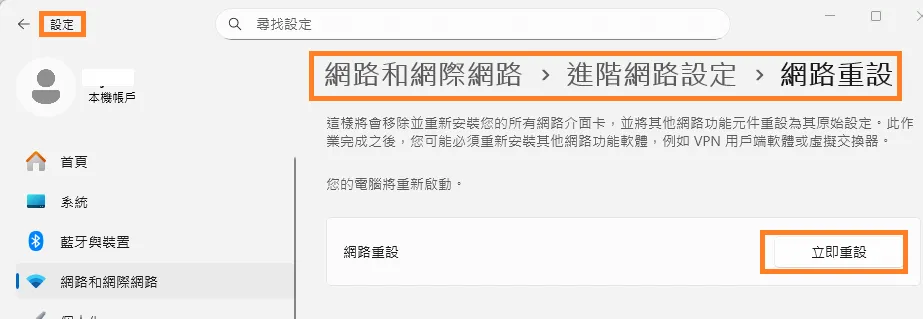
Right-click Start → Settings → Network & Internet → Advanced network settings → Network reset.
Disable Proxy Settings
Right-click Start → Settings → Network & Internet → Proxy → toggle Off.